IT operations automation: what to automate first, and who approves it
IT operations automation for mid-size companies: the six tasks to automate first, who approves each one, what to measure and what to keep with people.
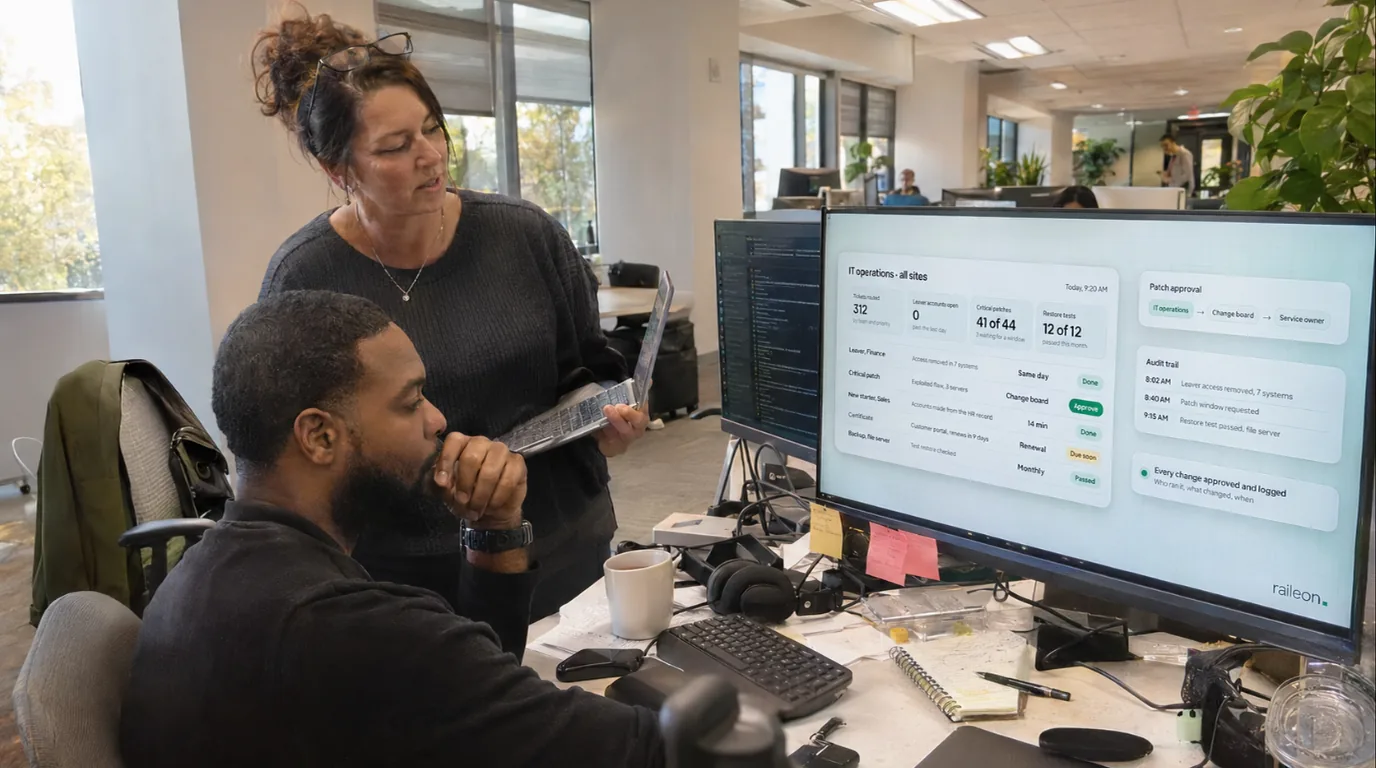
IT operations automation is software that runs the routine work of keeping a company's systems in order under written rules, with a person approving the risky steps and a record of every action. For an IT team at a mid-size company, six tasks usually come first: joiner, mover and leaver accounts; patching; backup checks and test restores; alert sorting and ticket routing; certificate and license renewals; and access reviews.
Below: the order, the approvals, the measures and what to leave with people. For mapping any process, see our guide on how to automate business processes.
What does IT operations automation cover?
Much of IT's routine work still runs on memory: a ticket to open accounts, a spreadsheet of licenses, a calendar reminder for a certificate. Automation doesn't replace your monitoring, backup or patching tools. It connects them to the HR system, the directory and the help desk with written rules: a trigger (a record changes, a date arrives, an alert fires), the steps that run on their own, the steps that wait for a person, and a record of what ran and who approved it.
What should an IT team automate first?
Start where a missed step costs most and the rules are already clear. The first three tasks guard against the worst days: a former employee who can still log in, an exploited flaw left open, a backup that won't restore. The next three cut daily noise and surprise outages.
| Task | Trigger | What runs on its own | Who approves | What to measure |
|---|---|---|---|---|
| Joiner, mover and leaver accounts | A hire, role change or last day in the HR system | Accounts opened, changed or disabled from each role's access list | The manager, for access beyond the list; the system owner, for admin rights | Time from last day to all accounts disabled; accounts with no matching person |
| Patching | A vendor release, or a new entry in CISA's catalog of exploited flaws | Patches go to a test group, then to each device group; installs verified | The change owner, once per group's plan, and for any exception | Share of devices patched by each plan's deadline |
| Backup checks and test restores | A backup job ends; a restore test comes due | Failed or missing jobs flagged; a sample restored and checked | The data owner signs off each restore test | Restore tests passed; time to restore |
| Alert sorting and ticket routing | A monitoring alert or a new ticket | Duplicates merged, asset and owner added, priority set, routed | No one for routing; the on-call lead for any change to a system | Alerts that reached no one |
| Certificate and license renewals | A set time before expiry; seats near the limit | Owners reminded, purchase request opened, seats compared with licenses | The budget owner, for each purchase | Certificates that expired |
| Access reviews | The review date you set | Each manager gets their team's access list; rejected access removed | The manager, line by line; the system owner, for admin accounts | Reviews finished on time |
How do you automate joiners, movers and leavers?
Connect the HR system to the directory, so a hire, a role change or a last day starts the work instead of a ticket. The catalog of security controls from the National Institute of Standards and Technology (NIST), SP 800-53, covers this under account management (AC-2): approval before accounts are created, notice to account managers when someone is terminated or transferred, regular reviews, and account processes aligned with "personnel termination and transfer processes."
- Joiners get their role's standard access list before day one. Anything beyond it waits for the manager.
- Movers are easy to miss. A role change should remove the old role's access, not only add the new one.
- Leavers have every account disabled at the time HR sets. Disable rather than delete; deletion waits for a person. Change the password of any shared account they knew, as AC-2 asks.
The catalog also describes automating account changes and auditing each one. For the HR side of a new hire, see our guide to employee onboarding automation.
Which patches should go first?
NIST's patch guide, SP 800-40 Rev. 4 (April 2022), is blunt: "There is no way that an organization can keep up with patching without automation." Its advice, in short:
- Keep the software inventory current by automation, not a monthly or quarterly scan.
- Sort devices into maintenance groups (staff laptops, data center servers, older systems that can't be patched), each with a written plan and deadlines.
- Roll out in phases: a small set of devices first, then the rest.
- Allow some flexibility, then force the install "after a grace period has ended."
- Verify, then keep checking, so a restore from an old backup doesn't quietly undo a patch.
To decide what goes first, use the Known Exploited Vulnerabilities (KEV) catalog from CISA, the U.S. government's cyber defense office. It lists flaws with reliable evidence of exploitation in the wild, published as a data feed a script can check against your inventory.
CISA's Binding Operational Directive 26-04, issued June 10, 2026, replaced BOD 22-01. It sets patch deadlines for the federal civilian executive branch from four questions: is the system exposed to the internet, is the flaw in the catalog, can an attacker automate the attack, and how much control does it give? For a flaw in the catalog, the deadline is 3 or 14 calendar days. Private companies are not bound by it, but CISA strongly recommends that all stakeholders "include a requirement to immediately address KEV catalog vulnerabilities as part of their vulnerability management plan."
So write your own deadlines into each plan, and let a catalog entry that matches your inventory open an urgent change automatically.
How do you know a backup will restore?
A job marked "completed" proves the job ran, not that the data comes back. SP 800-53's backup control (CP-9) calls for testing backup information "to verify media reliability and information integrity," and for restoring a sample as part of contingency plan testing. Automate the checks:
- Read every job's result daily. A job that didn't run counts as a failure.
- Compare coverage with the inventory, so every server and cloud account that should be backed up is.
- Restore a sample on a schedule to an isolated place, check it and record how long it took.
Keep deletion manual. SP 800-53 describes requiring two qualified people before backup information is deleted or destroyed.
What about alerts, tickets, renewals and access reviews?
Alert sorting and ticket routing. Rules can merge duplicate alerts, attach the asset, its owner and recent changes, set a priority and route each one. Routing needs no approval; anything that changes a system does.
Certificate and license renewals. Keep every certificate and license in the inventory with an expiry date and an owner, and remind owners well ahead. SP 800-53 also calls for tracking software protected by quantity licenses, so compare seats in use with seats bought before each renewal. The purchase stays with the budget owner.
Access reviews. AC-2 asks for accounts to be reviewed on a set schedule. Automation builds each manager's list, chases replies and removes what the manager rejects.
How do you keep automated IT operations under control?
An automation that can change accounts, servers and backups is a powerful user. Four controls keep it in check:
- Change control. SP 800-53's configuration change control (CM-3) has proposed changes reviewed and approved or rejected, with decisions documented and records kept. Its automated form blocks a change "until designated approvals are received." Agree once which changes are standard and which wait for a person.
- Its own accounts. Each automation runs under its own named service account with only the access its job needs, never an administrator's personal login.
- A record of every action: what ran, where, under which rule, who approved it and the outcome.
- An owner. A failed run alerts a named person, and silence counts as a failure.
What should IT not automate?
Automation can prepare and record these, but a person decides:
- Admin rights. SP 800-53 says users who need administrative privileges "receive additional scrutiny" from the people who approve that access.
- Risk decisions, such as delaying an emergency patch or accepting a system that can't be patched. SP 800-40 says exceptions to maintenance plans should be tracked closely and reviewed regularly.
- Deleting data. Accounts are disabled automatically; mailboxes, files and backups are deleted only after a person confirms.
- Incident calls. Declaring an incident, cutting a system off the network or restoring over live data is a person's call.
- Sensitive departures. For a dismissal, HR and IT agree the exact time, and a person starts the leaver run.
The same split works outside IT; see our guide to back office automation.
How does Raileon help with IT operations automation?
Raileon designs, builds and runs custom systems inside the tools a business already uses. Through our business process automation service, we map how a process really runs, automate the steps that follow rules, and run it for you. If a tool can't be connected, we tell you on the call.
Rules run on their own. Judgment gets a draft. A person approves what matters. You decide where the approval lines sit, every action is logged, and when something fails, your Raileon team fixes it.
It starts with a free 20-minute call with the founder, then a written proposal with what each automation does, what needs approval and what it costs. New builds and upgrades are priced by scope. Monthly care (monitoring, fixes, updates and a monthly review) starts from $1,999 a month. Cancel any time. Your plan runs to the end of the month you've paid for. No exit fee.
FAQ
What is IT operations automation?
It is software that runs routine IT work under written rules: accounts, patching, backup checks, ticket routing and renewals. Risky steps wait for a person, and every action is recorded.
Where should a mid-size company start to automate IT operations?
Start with leaver accounts, patching and backup checks, where a missed step costs most. Then add ticket routing, renewals and access reviews, one task at a time, each with a named owner.
Does automated patching need approval for every patch?
No. Approve each maintenance group's plan once, with its deadlines, and let routine patches follow it. Exceptions and emergency changes go to the change owner.
What should IT never fully automate?
Granting admin rights, accepting risk, deleting data or backups, and declaring an incident. Automation can prepare and record each one, but a person decides.
Which IT task keeps slipping?
Bring the one that keeps slipping: a leaver's accounts, a patch backlog or a backup nobody has restored. On a free 20-minute call, we'll tell you what we'd automate first.
About the author

Konstantin
Founder & CEO, Raileon
Konstantin has spent more than 15 years in systems, processes, automation and development. He has built businesses from scratch, from early crypto to tech ventures that led to acquisitions, and founded Raileon to build the software and automation he wished he'd had.
- 15+ years in IT, automation and development
- Founder & CEO of Raileon
- Based in North Miami, Florida

 By Konstantin