Custom database development: when spreadsheets stop working
Custom database development for companies outgrowing spreadsheets: when you need one, what it includes, and how to move your data without losing any.
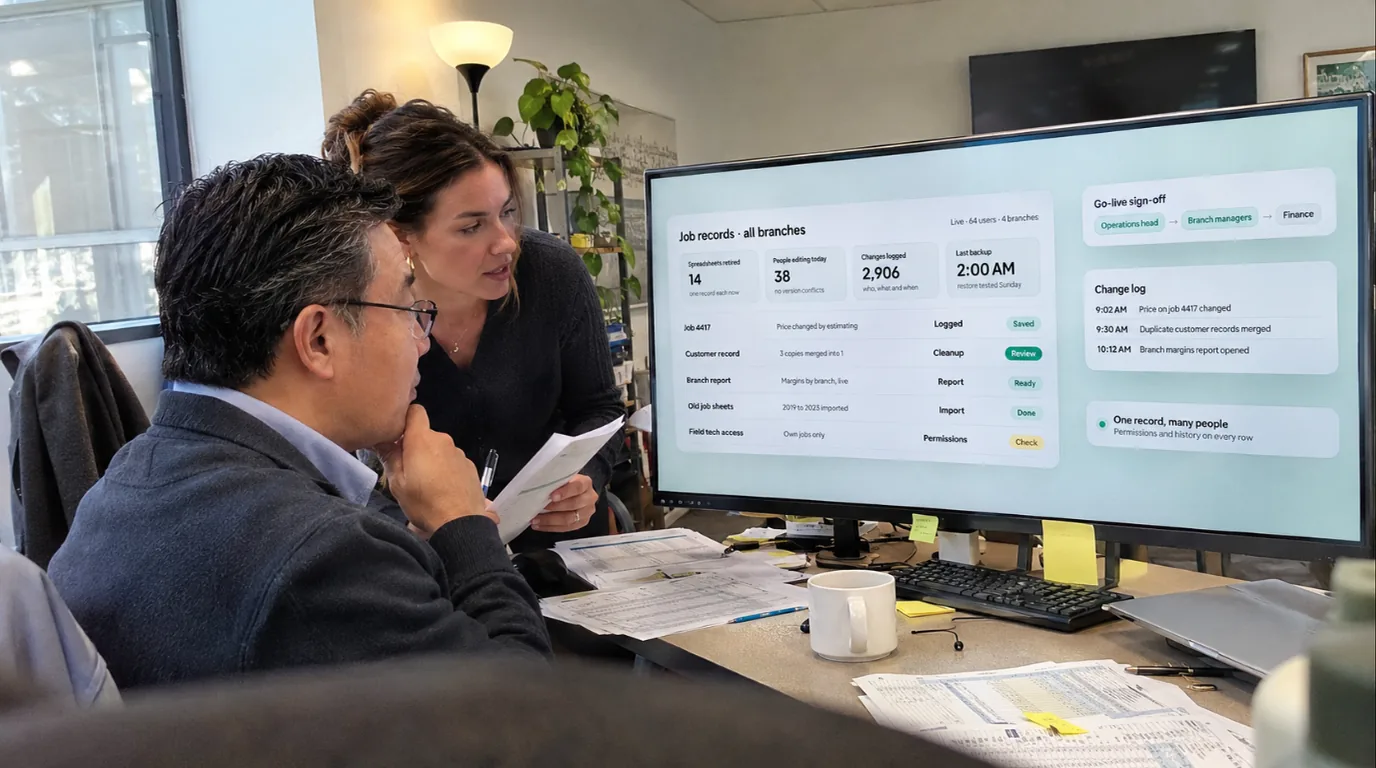
Custom database development is building a database application around your company's own records and rules: one shared store of data, the screens people use to enter and find it, who may see or change each record, a log of every change, reports and tested backups. You need one when several people work in the same records and nobody can say which copy is right.
A database application is custom software, so the build follows the stages in our guide to the custom software development process; this post covers what is specific to databases.
When do spreadsheets and desktop databases stop working?
A spreadsheet is a good way to start a record, and a desktop database on a shared drive is the usual next step. Both stop working in ways you can recognize:
- Several people edit the same records. Changes collide, or the file is locked when someone needs it.
- Copies multiply. One per branch, one per entity, one called "final v2", each a little different.
- Nobody can say who changed a number, what it was before, or why.
- Everyone sees everything. Pay rates, margins and customer details are open to anyone with the file.
- The rules live in one head. Only the builder knows which columns must match, and that person is busy or gone.
- It slows down as rows pile up, and reports take a day to rebuild.
An honest test: count the signs that apply to records that matter (money, customers, people, anything an auditor may ask about). One sign is a reason to tidy the file: keep one copy, lock the formulas, limit who opens it. Two or more is a reason to scope a database application.
Which fits: spreadsheet, desktop database, off-the-shelf or custom?
Four options compared:
| Option | People working at once | Permissions | Audit trail | Connections | Who maintains it |
|---|---|---|---|---|---|
| Shared spreadsheet | A few, with edits that collide | By file or sheet, rarely by record or field | File versions at best | Exports, copy and paste | Whoever built it |
| Desktop database | A small team on one network | Basic, and often skipped | Only if the builder added one | Imports and exports by hand | Its builder, if still there |
| Off-the-shelf software | Many, by license | The roles the product offers | Whatever the product logs | Built-in connectors, sometimes through add-ons | The vendor, on its roadmap |
| Custom database application | As many as the work needs | Roles matched to your jobs, down to the field | Every change: who, what, when, before and after | Built to your other systems | The builder on a care plan, or your team |
If a product covers your records well, such as accounting or a standard customer system, buy it. A custom database fits records that follow your own way of working, such as job specifications, inspections, rebates or approvals across several entities.
What does a custom database application include?
The database stores the records; the application is what people use. It has seven parts:
- A data model. Each kind of record (customer, job, asset, inspection), its fields and how records relate: a job belongs to one customer and has many visits. This is where a spreadsheet's combined columns get split and its color codes become real fields.
- Forms with checks. A catalog of security and privacy controls from the National Institute of Standards and Technology (NIST) describes input checks on character set, length, numerical range and acceptable values. A date field takes only dates; a status takes only the allowed statuses.
- Permissions. Who can see, add, change or close each kind of record.
- An audit trail. A record of every change.
- Reports. Saved views, exports and, if managers need one, a dashboard; see our guide to custom dashboard development.
- Connections. Links to accounting, payroll or the customer system, so records flow instead of being retyped; our guide to data entry automation covers that work.
- Backups and recovery. Copies you have tested, and a plan for restoring them.
Who should be able to see and change each record?
Start from the jobs, not the people. NIST's catalog calls for least privilege: allowing only the access that is "necessary to accomplish assigned organizational tasks." In a database application, that becomes roles. As an example:
- A branch manager sees and edits that branch's customers only.
- Sales can see credit terms but not change them; finance can.
- Nobody deletes a record. It is closed or archived, so its history stays.
- An administrator manages users but doesn't edit records.
What should the audit trail record?
NIST's glossary defines an audit trail as "a chronological record that reconstructs and examines the sequence of activities" behind an operation or event. In a database application, every change to a record should carry:
- who made it, and when;
- what changed, with the value before and after;
- where it came from: a form, an import or a connected system;
- whether it succeeded.
That follows the NIST catalog's list for audit records: what happened, when, where, the source, the outcome and who was involved. The catalog also asks you to choose which events to log and to review that choice; its examples include password changes, failed logons and administrator actions. So log failed sign-ins, permission changes and exports as well as record changes.
The trail itself must be protected "from unauthorized access, modification, and deletion." A log that the people it records can edit proves nothing.
How should backups and recovery work?
The NIST catalog ties how often backups run to recovery time and recovery point objectives. Its glossary defines the recovery point objective as "the point in time to which data must be recovered after an outage." In plain words, the recovery point is how much recent work you can afford to lose, and the recovery time is how long you can be without the system. Agree both in writing before the build.
Three more rules from the catalog:
- Protect the backups. The catalog asks for their "confidentiality, integrity, and availability" to be protected, like the live data's.
- Test them on a schedule "to verify media reliability and information integrity," and restore a sample. A backup nobody has restored is a hope.
- Recover transactions cleanly. For transaction-based systems, which include database management systems, the catalog names "transaction rollback and transaction journaling," so a change that fails halfway is undone instead of half saved.
How is a custom database built, step by step?
- List the records and the people: who creates, changes, approves and reads each kind of record.
- Design the data model and agree it with the people who know the records.
- Build the forms, permissions and audit trail first, in stages you review on working screens.
- Load a copy of real data and test with the people who will use it, awkward cases included.
- Add reports and connections once the records are right.
- Move the data, train people and launch, then run it: backups tested, the log reviewed and one named owner for changes.
How do you move off spreadsheets without losing data?
Most of the risk sits in the move. A sequence that works:
- Find every copy: the shared drive, email attachments, each branch's version. Decide which copy is the master, or how conflicting copies get merged.
- Map every column to a field. Watch for columns that hold two things, notes typed into number columns, and colors or bold text that carry meaning, such as a red row for "on hold".
- Clean before loading. Duplicates, blank required fields, mixed date formats, five spellings of one customer. A person who knows the records decides each fix; a script shouldn't guess.
- Load a test copy. The new form checks reject what doesn't fit, which shows what is left to clean.
- Reconcile. Record counts and totals by branch, entity or category should match the old files, and the people who use the data spot-check records they know.
- Cut over on a date. Make the old files read-only, load the last changes and switch. Archive the old files: the new audit trail starts on day one, and earlier history lives in them.
For month-end records, consider running both systems for one cycle and comparing.
How does Raileon handle custom database development?
We build custom software around how your company already runs, then run it for you. That includes moving a spreadsheet-and-email process, or an aging tool, onto something your team can rely on. If an existing product fits what you need, we'll tell you on the first call.
It starts with a free 20-minute call with the founder. A written proposal sets out what we'll build and what it connects to, with the exact price before anything starts. You review working screens as they come together, not a big reveal at the end. Then we train your people on it, and we host, monitor, update and back up what we built.
The build is priced by scope. Monthly care (hosting, monitoring, fixes and updates) starts from $1,999 a month. Cancel any time. Your plan runs to the end of the month you've paid for. No exit fee.
Every client's data is kept separate, encrypted in transit and at rest, and backed up daily. Our terms are plain: Raileon owns the code it builds, and your data stays yours.
FAQ
What is custom database development?
It is building a database and the application around it for one company's records and rules: the data model, forms, permissions, a log of changes, reports and backups. It usually replaces shared spreadsheets or desktop databases a growing team has outgrown.
What does custom database software development include?
It should include the data model, forms with checks, permissions, an audit trail, reports, connections to your other systems and tested backups. It should also cover moving your existing data, checked against the old totals, and someone to run it after launch.
When should we replace a spreadsheet with a database?
When several people edit the same records, copies multiply, nobody can say who changed a number, or the file holds information not everyone should see. If only one of those is true, tidying the spreadsheet may be enough.
Can we keep using spreadsheets after the move?
Yes, for analysis: a database application can usually export reports to a spreadsheet. The difference is that the spreadsheet becomes a copy for reading, and the database stays the one place records are changed.
Which spreadsheet does your company run on?
Bring the spreadsheet or desktop database your team can't do without. On a free 20-minute call, we'll tell you whether it needs a database, and what we'd build first.
About the author

Konstantin
Founder & CEO, Raileon
Konstantin has spent more than 15 years in systems, processes, automation and development. He has built businesses from scratch, from early crypto to tech ventures that led to acquisitions, and founded Raileon to build the software and automation he wished he'd had.
- 15+ years in IT, automation and development
- Founder & CEO of Raileon
- Based in North Miami, Florida

 By Konstantin